Product Overview
Last update: October 7, 2026
Product: Tolk for Cisco UC
Version: v202609
Author: SARL SOURDEAU CONSULTING
Project Overview
What is Tolk for Cisco UC
Tolk for Cisco UC is a Model Context Protocol (MCP) server that bridges AI/LLM platforms to Cisco Unified Communications on-premises infrastructure. It enables any MCP-compatible AI agent — such as Claude Desktop, VS Code, Open Code, Cursor, or custom LLM-based tools — to interact directly with Cisco UC systems through a secure, authenticated, and auditable interface.
The server exposes Cisco UC operations (using the product API) as MCP tools, along with guided workflows as MCP prompts and reference documentation as MCP resources. AI agents consume these capabilities using the normalized MCP protocol.
Key value proposition:
- 🗣️ Natural Language Control — empower Cisco UC administrators and operators with AI-assisted operations driven by natural language through your AI agent — configuration queries, security audits, health checks, report generation, and troubleshooting.
- 🚀 Faster AI Integration — a single solution to interconnect all Cisco UC products with any MCP-compatible AI agent. No Cisco UC expertise required — the MCP server provides all the context, tools, and domain-specific prompts the AI needs to interact correctly with UC products.
- 🔒 Enterprise Security & Governance — integrating the most demanding security features makes Tolk suitable for regulated environments, government networks, and any organization where data sovereignty and high security are requirements.
- 🔗 Cross-Platform Workflows — orchestrate complex multi-product operations in a single natural-language request, spanning all supported Cisco UC platforms.
- 🖥️ Intuitive Web Administration — run the whole server in a few clicks from a modern, translated in your local language web console: MCP clients and RBAC profiles, certificates, backups, real-time statistics, connectivity tests, maintenance mode, etc.
Use-case examples — what you can ask your AI agent:
- " Create user Marie, assigning her a phone, a voicemail, a Jabber client, and a personal video conference room "
- " Add speed dials to Peter's phone for Marie and David "
- " Create a secure video conference space named — Crisis Room — "
- " Perform a security audit of all European CUCM clusters "
- " Send the following message to all phones in the Orion building: — System maintenance starting at 10:00pm — "
- " Help me to analyze John's call issue yesterday at 9:50am "
- " Upgrade the phones and the RoomOS devices "
- " Analyze the devices' environmental room-quality sensors "
- " Install the security patch on the CUCM cluster "
- " Add to the directory of all RoomOS devices a contact for Compagnie-A's CEO (ceo@compagnie-a.com) "
Deployment Model
Standard deployment model
The standard deployment model is:
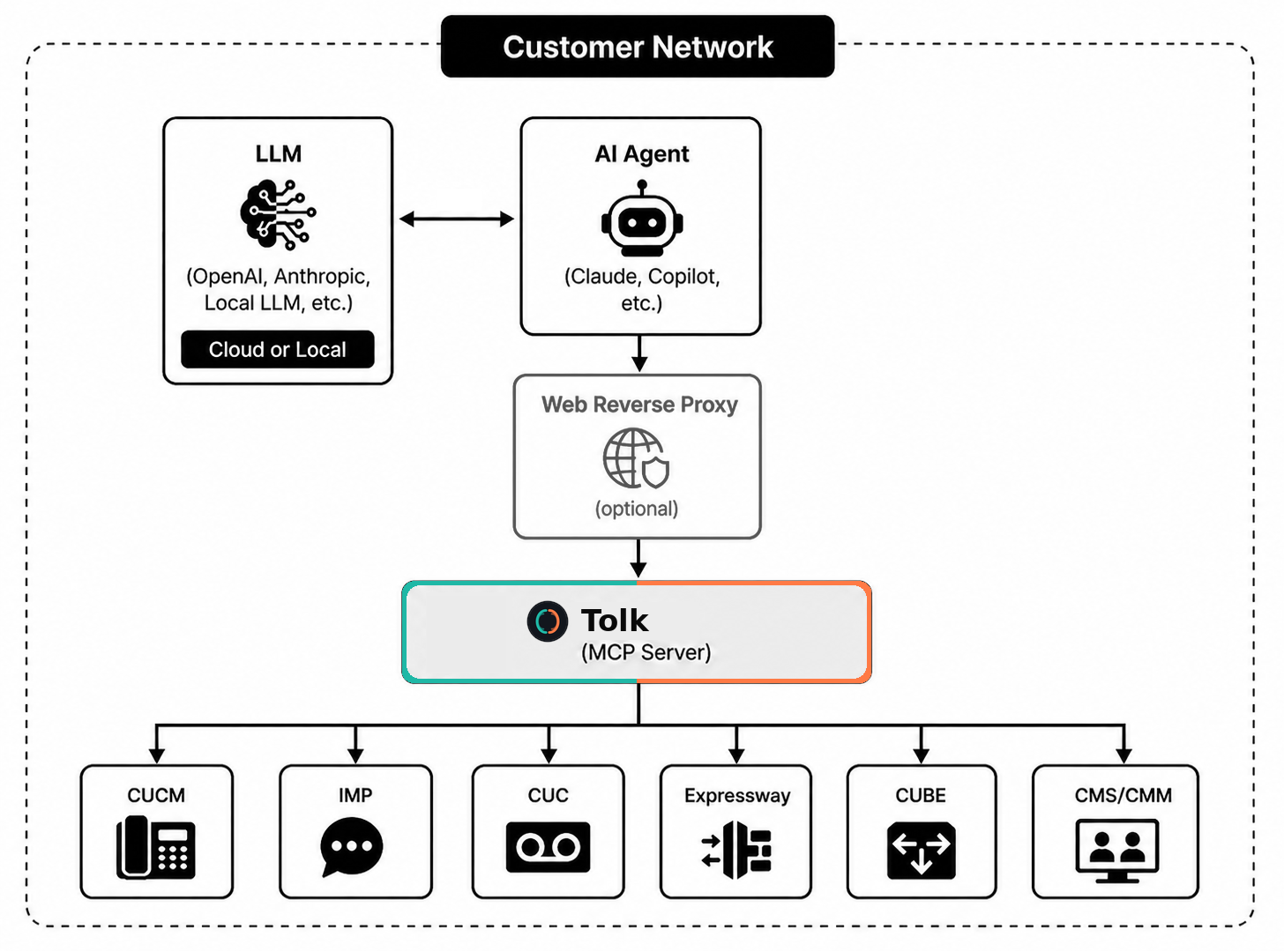
Text version (click to expand)
┌─────────────────────────────────────────────────────────────────────────────────────┐
│                                       Customer Network                              │
│                                                                                     │
│  ┌─────────────┐        ┌──────────┐        ┌─────────────┐                         │
│  │     LLM     │        │ AI Agent │        │    Web      │                         │
│  │ (OpenAI,    │◄──────►│ (Claude, │───────►│  Reverse-   │                         │
│  │  Anthropic, │        │  Copilot,│        │   Proxy     │                         │
│  │  Local LLM) │        │  etc.)   │        │ (optional)  │                         │
│  └─────────────┘        └──────────┘        └──────┬──────┘                         │
│   Cloud or Local                                   │                                │
│                                                    │                                │
│                                                    ▼                                │
│                                             ┌──────────────┐                        │
│                                             │     Tolk     │                        │
│                                             └──────┬───────┘                        │
│                                                    │                                │
│          ┌────────────┬────────────┬───────────┬───┴────────┬────────────┐          │
│          ▼            ▼            ▼           ▼            ▼            ▼          │
│    ┌──────────┐ ┌──────────┐ ┌──────────┐ ┌──────────┐ ┌──────────┐ ┌──────────┐    │
│    │   CUCM   │ │   IMP    │ │   CUC    │ │   EXP    │ │   CUBE   │ │ CMS/CMM  │    │
│    └──────────┘ └──────────┘ └──────────┘ └──────────┘ └──────────┘ └──────────┘    │
│                                                                                     │
└─────────────────────────────────────────────────────────────────────────────────────┘
On-premises design - Compatible air-gapped
Tolk for Cisco UC is designed for fully on-premises, compatible with air-gapped deployment:
- No cloud dependency — the server runs entirely on the customer's infrastructure. No data is sent to any external service. No telemetry, no analytic.
- No outbound connections — the server only connects to the Cisco UC nodes configured. It never initiates connections to the internet.
- Offline licensing — licenses are issued offline by the editor and installed locally. No license server or online activation is required.
- Offline upgrades — releases are delivered as
.tar.gzarchives (SHA-512 published in DNS, installed files checked against a signed manifest). The installation and the upgrades are offline. - Offline AI operation — the MCP protocol runs over the local network between the AI agent and the MCP server. If the AI agent itself runs locally (e.g., a local LLM), the entire chain operates without any internet connectivity.
- Reverse proxy support (optional) — a web reverse proxy (e.g., Nginx, Apache, HAProxy) can be placed in front of the MCP server for network segmentation.
- High availability — Tolk supports redundancy based on the virtualization platform hosting it (e.g., VMware HA, Hyper-V failover clustering, Proxmox HA). No application-level clustering is required.
Hosting
Tolk for Cisco UC runs on any OS capable of running Docker.
Recommended deployment: a Docker container hosted on your infrastructure (VMware vSphere, Hyper-V, Proxmox, Docker Engine, or equivalent).
Products Compatibility
Tolk for Cisco UC currently supports the following Cisco UC products:
| Product | Full Name | Multi-Cluster | Query Protocols | Supported Versions |
|---|---|---|---|---|
| CUCM | Cisco Unified Communications Manager | ✅ | AXL/SOAP RIS SSH |
14 15 |
| IMP | Cisco Instant Messaging & Presence | ✅ | AXL/SOAP SSH |
14 15 |
| CUC | Cisco Unity Connection | ✅ | CUPI SSH |
14 15 |
| Phones | Cisco IP Phones 78xx / 88xx / 98xx | n/a | HTTPS | 78xx/88xx: 14.x PhoneOS 4.x & 5.x |
| RoomOS | Cisco RoomOS devices (Room / Desk / Board / Codec) | n/a | xAPI/HTTPS | 11.x 26.x |
Multi-cluster support: Tolk for Cisco UC can manage multiple independent clusters simultaneously.
Add-ons Compatibility Matrix
Tolk for Cisco UC supports a modular add-on system. Add-ons are AI-guided workflows that leverage the server's tools and embedded reference resources to perform complex multistep operations.
| Add-on | Description | CUCM | IMP | CUC | Status |
|---|---|---|---|---|---|
| Security Audit | Automated configuration security audit based on Cisco Security recommendations. PDF report. | ✅ | ✅ | ✅ | GA |
| Health Check | System health verification | 🔜 | 🔜 | 🔜 | Planned |
| Troubleshooting | AI-powered diagnostic assistance | 🔜 | 🔜 | 🔜 | Planned |
| Certificate Renewal | Automated certificate lifecycle management: inventory, expiry monitoring, renewal workflow. | 🔜 | 🔜 | 🔜 | Planned |
| Upgrade | Upgrade planning: pre-upgrade checks, scheduled upgrades, COP file management. | In progress (see the note) | 🔜 | 🔜 | Planned |
Upgrade add-on — current coverage
Already supported on CUCM: patch installation (COP files) and system upgrades of IP phones and RoomOS devices (server-driven upgrade campaigns). CUCM major upgrades and CUCM OS Service Updates (SU) are coming soon.
Built-in modules:
| Module | Description |
|---|---|
| Reports | Markdown report generation and PDF export. |
| Infra | HTTP endpoints for health check, Prometheus metrics, server status, and OAuth token management. |
| License Verification | RS256-signed JWT license verified at startup and monitored periodically by a background watchdog. |
| Automatic Backups | Periodic encrypted backups with local retention, optional SFTP export, and interactive restore. |
| Packaged-Upgrades | Upgrade tool (tolk-setup.sh) with --dry-run preview: .env reconciled with the new release, .env backup, new settings highlighted in the admin UI. |
| Connectivity Test | Admin UI > Operations > Tools: on-demand probe of a CUCM, IMP, CUC, phone or RoomOS target (DNS, TCP, TLS/certificate, credentials per protocol, latency, version, AXL/RIS schemas, services, ITL / CTL hash of phones and RoomOS codecs, screenshot, optional test message). Screenshot and test message require read/write access to Tools. Credentials typed per run; once validated by the test they can be added to an MCP client's encrypted vault (requires read/write access to Clients). |
| Admin Web UI | Translated browser-based administration interface, on a dedicated HTTPS listener: dashboard, settings, products, custom prompts, administrators, MCP clients, statistics, reports, backup/restore, licensing, audit, logs, tools, system & reload. Also serves as recovery console when the license is invalid or expired. |
| Maintenance Mode | Maintenance mode management to reject connections during maintenance operations. |
| Custom Prompts | Per-product custom MCP prompts (workflows) created, imported, enabled or disabled from the Admin Web UI. Stored as data — never executed as code — and exposed in the product namespace (e.g. cucm_…). |
Roadmap
| 202612 | 202703 | Backlog |
|---|---|---|
| Cisco Meeting support | Cisco ISR / CUBE / CME support | Assistant for troubleshooting |
| Syslog support | Cisco Expressway support | Assistant for certificate renewal |
| Assistant for upgrades | ||
| CUC CUMI Support (voicemail interactions) |
*ETA subject to change.
Versions & End-of-Life Policy
Tolk for Cisco UC follows a calendar-based versioning scheme: vYYYYMM (e.g., v202609 for the September 2026 release).
Current release status:
| Release | Status | End of Life |
|---|---|---|
| v202605 | ✅ GA | n/c |
| v202606 | ✅ GA | n/c |
| v202609 | ✅ GA | n/c |
| v202612 | 🔜 Next | n/c |
Support policy:
- GA releases receive new features, security patches, bug fixes, and compatibility updates.
- End of Life (EOL) dates are announced at least 12 months in advance.
- Only the latest GA release is actively supported. Customers are encouraged to upgrade promptly using the built-in upgrade system.
- License validity is version-agnostic — a valid license continues to work across upgrades.
For feature requests, bug reports, or EOL inquiries: tolk@sourdeau.com
Architecture & Design
High-Level Architecture
The following diagram illustrates the internal architecture of Tolk for Cisco UC, from the AI agent connection through the security layers down to the Cisco UC backends:
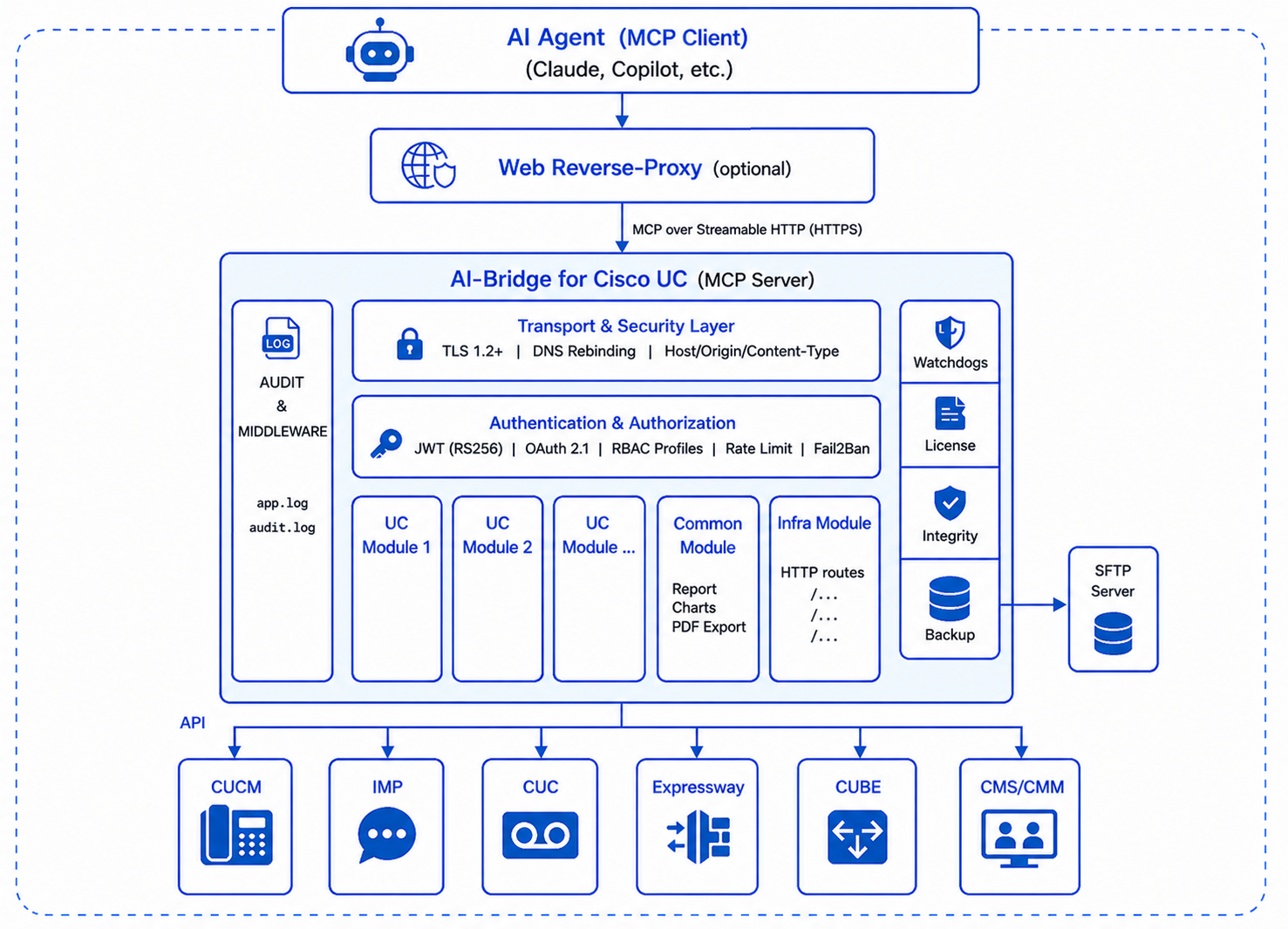
Text version (click to expand)
┌──────────────────────────────────────────────────────────────────────────────────────────────┐
│                                    AI Agent (MCP Client)                                     │
│                       Claude Desktop / GitHub Copilot / Cursor / Custom                      │
└────────────────────────────────────────────┬─────────────────────────────────────────────────┘
                                             │
                                             │
┌──────────────────────────────────────────────────────────────────────────────────────────────┐
│                                     WEB Reverse-Proxy                                        │
│                                         (optional)                                           │
└────────────────────────────────────────────┬─────────────────────────────────────────────────┘
                                             │
                                             │ MCP over Streamable HTTPS
                                             ▼
┌──────────────────────────────────────────────────────────────────────────────────────────────┐
│                                           Tolk                                               │
│                                                                                              │
│ ┌──────────┐ ┌────────────────────────────────────────────────────────────────┐ ┌──────────┐ │
│ │          │ │                    Transport & Security Layer                  │ │          │ │
│ │          │ │      TLS 1.2+ │ DNS Rebinding │ Host/Origin/Content-Type       │ │ Watch-   │ │
│ │  AUDIT   │ └────────────────────────────────────────────────────────────────┘ │ dogs     │ │
│ │    &     │ ┌────────────────────────────────────────────────────────────────┐ │          │ │
│ │MIDDLEWARE│ │                 Authentication & Authorization                 │ │──────────│ │
│ │          │ │ JWT (RS256) │ OAuth 2.1 │ RBAC Profiles │ Rate Limit │ Fail2Ban│ │          │ │
│ │          │ └────────────────────────────────────────────────────────────────┘ │ License  │ │
│ │          │ ┌───────────────┬───────────────┬───────────────┬───────────────┐  │          │ │
│ │ app.log  │ │               │               │               │               │  │──────────│ │
│ │ audit.log│ │      UC       │      UC       │    Common     │ Infra Module  │  │          │ │
│ │          │ │    Module 1   │    Module 2   │    Module     │               │  │ Integrity│ │
│ │          │ │               │               │               │ HTTP Routes   │  │          │ │
│ │          │ │               │               │ Reports       │ /health       │  │──────────│ │    ┌────────────┐
│ │          │ │               │               │ Charts        │ /metrics      │  │          │ │    │            │
│ │          │ │               │               │ PDF Export    │ /status       │  │ Backup   │ │───►│    SFTP    │
│ │          │ │               │               │               │ /token        │  │          │ │    │   Server   │
│ │          │ │               │               │               │ /revoke       │  │          │ │    │            │
│ └──────────┘ └───────────────┴───────────────┴───────────────┴───────────────┘  └──────────┘ │    └────────────┘
│                                                                                              │
└────────────────────────────────────────────────┬─────────────────────────────────────────────┘
          ┌───────────────┬───────────────┬──────┴────────┬───────────────┬──────────────┐
          ▼               ▼               ▼               ▼               ▼              ▼
    ┌────────────┐  ┌────────────┐  ┌────────────┐  ┌────────────┐  ┌────────────┐  ┌────────────┐
    │            │  │            │  │            │  │            │  │            │  │            │
    │    CUCM    │  │    IMP     │  │    CUC     │  │ Expressway │  │    CUBE    │  │  CMS/CMM   │
    │            │  │            │  │            │  │            │  │            │  │            │
    └────────────┘  └────────────┘  └────────────┘  └────────────┘  └────────────┘  └────────────┘
Modules
The following table describes all the architecture components, from the external clients down to the built-in security layers and background subsystems.
External components — not part of Tolk, provided by the customer environment:
| Component | Description |
|---|---|
| LLM | Large Language Model used by the AI agent (e.g., OpenAI GPT, Anthropic Claude, or a local model). Hosted in the cloud or on-premises. |
| MCP Client | AI agent that communicates with Tolk over the MCP protocol (e.g., Claude Desktop, GitHub Copilot, Cursor, VS Code, custom agent). |
| Web Reverse Proxy | Optional component placed in front of Tolk for TLS termination, or network segmentation (e.g., Nginx, Apache, HAProxy). |
| SFTP Server | SFTP repository to export the application backups |
Security & middleware layers — always active, built into the server:
| Component | Description |
|---|---|
| Transport Security | ASGI middleware enforcing TLS 1.2+, DNS rebinding protection, and Host / Origin / Content-Type header validation on every incoming request. |
| Authentication & Authorization | JWT (RS256) verification, OAuth 2.1 client credentials flow, RBAC profile enforcement, per-client and global (per-host) rate limiting, and Fail2Ban IP blocking. |
| Audit & Middleware | MCP-level middleware logging every tool call, resource read, and prompt request to audit.log with client identity, source IP, and result. |
Product modules — loaded conditionally based on license entitlements:
| Module | Namespace | MCP Tools | Description |
|---|---|---|---|
| CUCM | cucm_ |
49 | Full management of Cisco Unified Communications Manager clusters: credentials, AXL/SOAP operations, RIS real-time queries, VOS CLI commands, connectivity diagnostics, feature service restart, COP file installation (21 tools) — plus optional sub-modules: IP phones web access and firmware upgrade campaigns (10 tools), RoomOS codecs xAPI over HTTPS and software upgrade campaigns (18 tools). |
| IMP | imp_ |
14 | Management of Cisco IM & Presence Service nodes: credentials, AXL/SOAP operations, VOS CLI commands, connectivity diagnostics. |
| CUC | cuc_ |
13 | Management of Cisco Unity Connection nodes: credentials, CUPI REST operations (users, mailboxes, call handlers, distribution lists, restriction tables), VOS CLI commands, SSH diagnostics. |
Built-in modules — always loaded, not license-gated:
| Module | Namespace | MCP Tools | Description |
|---|---|---|---|
| Common | common_ |
5 | Cross-product report engine: Markdown report read/write, 9 chart types (pie, bar, donut, radar, gauge, treemap, grouped bars, waterfall, severity matrix), PDF export. |
| Infra | infra_ |
10 | Server infrastructure: session bootstrap, RBAC self-discovery, documentation discovery, license state, plus the HTTP endpoints listed below. |
Administration — built-in, served on its own HTTPS listener:
| Component | Description |
|---|---|
| Admin Web UI | Browser-based administration console (ADMIN_UI_PORT, default 9443, path /admin), with its own authentication, administrator RBAC and audit. Can be disabled (ADMIN_UI_ENABLED=0). |
HTTP routes:
| Listener | Route | Method | Description |
|---|---|---|---|
MCP (MCP_SERVER_PORT, default 8443) |
/mcp (MCP_SERVER_URL_PATH) |
GET/POST | MCP endpoint (Streamable HTTP) |
| MCP | /health |
GET | Liveness / readiness probe (maintenance status once drained) — no authentication |
| MCP | /status |
GET | Full server status — bearer token required |
| MCP | /metrics |
GET | Prometheus metrics — bearer token required |
| MCP (OAuth 2.1 modes only) | /token |
POST | OAuth token endpoint (client_credentials, authorization_code + PKCE) |
| MCP (OAuth 2.1 modes only) | /revoke |
POST | Token revocation (RFC 7009) |
| MCP (OAuth 2.1 modes only) | /authorize |
GET/POST | Authorization endpoint — login form and authorization code issuance |
| MCP (OAuth 2.1 modes only) | /.well-known/oauth-authorization-server |
GET | Authorization server metadata (RFC 8414) |
| MCP (OAuth 2.1 modes only) | /.well-known/oauth-protected-resource/.well-known/oauth-protected-resource/mcp |
GET | Protected resource metadata (RFC 9728) |
Admin (ADMIN_UI_PORT, default 9443) |
/admin/ |
GET/POST | Admin Web UI |
| Admin | /admin/health |
GET | Admin UI liveness probe (container healthcheck, recovery mode) |
Background watchdogs — independent threads running after startup:
| Watchdog | Periodicity | Description |
|---|---|---|
| License | 24 h | Check licensing compliance - Periodically re-verifies the RS256-signed license JWT |
| Integrity | 24 h | Check server integrity - Periodically re-runs manifest verification and signature check |
| Backup | 24 h | Backup execution - Periodically creates encrypted backup archives with optional SFTP export |
Standards & RFC Compliance
Tolk for Cisco UC implements a comprehensive set of industry standards across its security, authentication, cryptography, and transport layers, including:
- OAuth 2.0 / 2.1 — RFC 6749 (Authorization Framework), RFC 6750 (Bearer Tokens), RFC 7009 (Token Revocation), RFC 7617 (HTTP Basic Auth), RFC 8414 (Server Metadata Discovery), RFC 9068 (JWT Access Tokens), RFC 9700 / BCP 212 (Security Best Practices)
- JWT & Cryptography — RFC 7519 (JWT), RFC 7518 (JWA / RS256), RFC 8017 (RSA-PSS & RSA-OAEP), RFC 2898 / RFC 8018 (PBKDF2), NIST FIPS 180-4 (SHA-256/512), NIST SP 800-38D (AES-256-GCM)
- TLS & HTTP Security — RFC 5280 (X.509), RFC 8446 / RFC 5246 (TLS 1.3 / 1.2), RFC 9110 (HTTP Semantics), RFC 6585 (HTTP 429)
- Logging & Integrity — RFC 8259 (JSON), RFC 5424 (Syslog Levels), RFC 4251–4254 (SSH/SFTP)
For the complete compliance matrix with implementation details, see the Reference page.
Licensing
How Licensing Works
Tolk for Cisco UC uses a simple, offline licensing model — no license server, no internet activation, no subscription portal.
A license is a digitally signed JWT file (license.jwt) issued by the editor and installed locally on the server. The server verifies the license signature at startup and periodically in the background — entirely offline.
What a License Contains
| Field | Description |
|---|---|
| Customer | Organization name |
| Tier | License tier (e.g., demo, standard, professional) |
| Products | List of enabled product modules (e.g., cucm, imp, cuc) |
| Max clients | Maximum number of configured AI clients |
| Hostname binding | The license is bound to a specific server hostname — it cannot be reused on another host |
| Expiry date | License validity end date |
| Grace period | Extra period after expiry during which the server continues to operate (default: 30 days) |
How to Obtain a License
Licenses are issued by SARL SOURDEAU CONSULTING. To request a license:
- Contact tolk@sourdeau.com with your intended deployment scope, and order a license.
- You will receive a
license.jwtfile by secure transfer, along with installation instructions (a support service can be ordered). - Drop the file into
secrets/license.jwt— the server picks it up at next startup or on the next watchdog cycle (no restart required for renewal).
License validity is version-agnostic — a valid license continues to work across upgrades.
Demo license
A time-limited demo license is available on request to evaluate the product in your environment.
License states and renewal are described on the Operations page.